
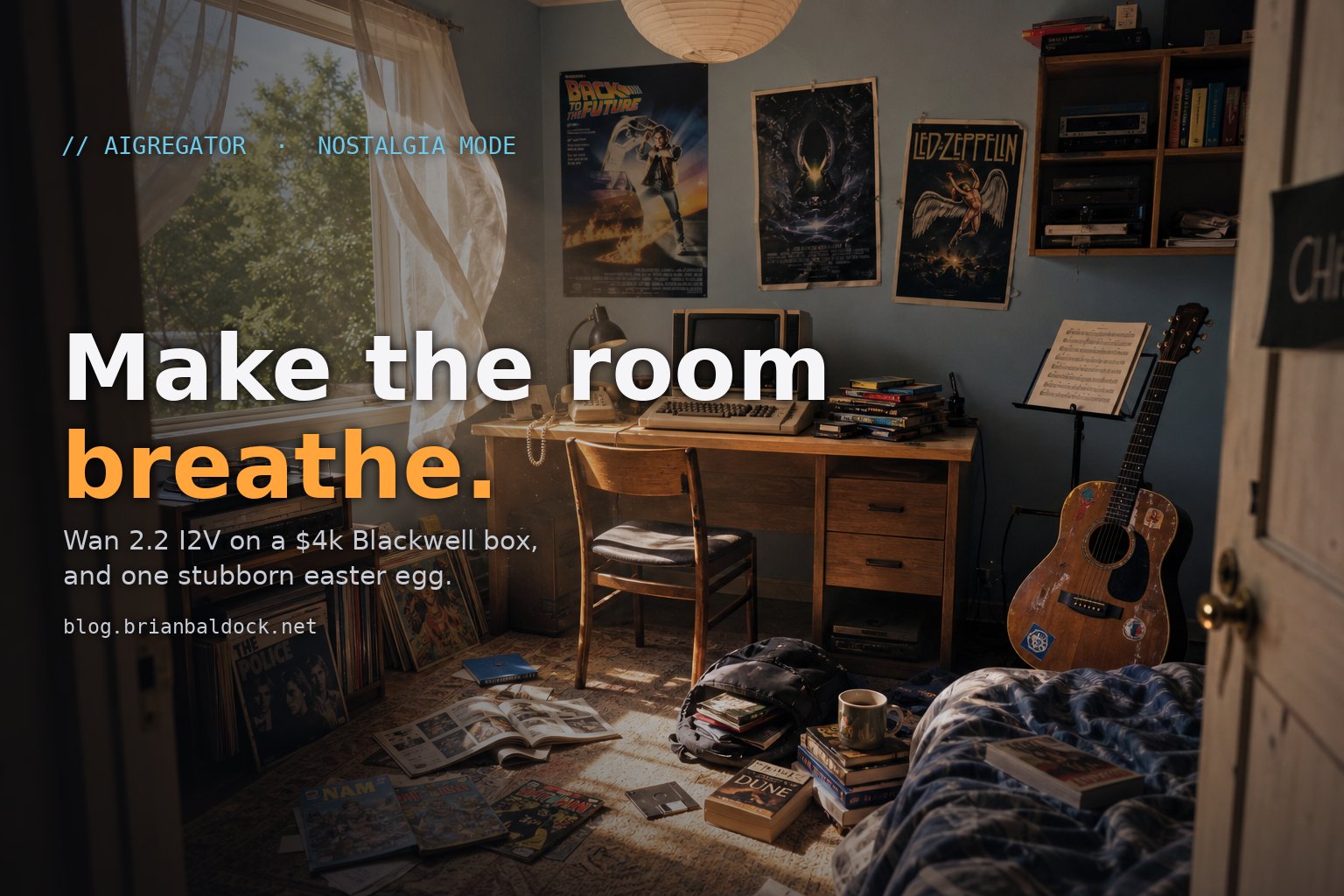
AIgregator has a hidden mode. Pick the “nostalgia” theme and the news site falls away. You walk into a teenager’s bedroom on a summer afternoon in the 90s, sit down at a Commodore 64, and the thing powers on and dials a BBS to fetch the day’s AI news.
I wanted that room to be alive. Curtain breathing in the breeze. Leaves moving outside the window. Dust drifting through the sunbeam. Not a frozen photo with a Ken Burns pan faked over it. A real moving room.
Getting there meant running the current open-source state of the art in image-to-video on hardware that shipped before the docs did. Here’s everything that broke, and how the room finally started breathing.
The three ways to fake a living room, and why I picked the wrong one first
Start with the easy version. You have one good still image of the bedroom. You want it to move. There are three honest ways to do that, in increasing order of cost and payoff:
- CSS only. Push the camera in with a
transform: scale()over a few seconds. Ken Burns with a tripod. Cheap, ships today, and the curtain stays frozen the whole time. - Layer segmentation. Cut the curtain and the tree out of the image into their own transparent layers, then animate just those with CSS keyframes while the room stays still. More work, much better.
- Real image-to-video. Hand the still to a video model and get actual photoreal motion back. The real thing. Also the expensive thing.
I talked myself into option 2 first. It’s the clever middle path. The problem showed up the moment I tried to find the curtain.
To cut a clean mask you need to know exactly where the curtain is in pixels. I asked the vision tooling for bounding boxes: curtain, tree, window, the monitor screen. It came back with a curtain box that overlapped the monitor. Those two things are on opposite sides of the room. The box was geometrically impossible, which meant the model wasn’t measuring anything, it was guessing and handing me confident numbers.
A vision model that hallucinates coordinates is worse than no vision model. No model makes you go look. A confident wrong one makes you build on sand.
That killed option 2. You cannot mask what you cannot locate, and every wrong mask is a wasted inpainting call. So the choice collapsed to: fake it with pure CSS, or go get real compute and do option 3 properly.
I had real compute sitting in the closet.
Why Wan 2.2, and why the box matters
The box is a DGX Spark. GB10 Blackwell, 128 GB of unified memory, about four grand. It’s NVIDIA’s “AI on your desk” machine, and it is new enough that when you go looking for “how do I run X on a Spark,” the answer is usually a forum thread from someone else who also couldn’t find the answer.
The model is Wan 2.2 I2V, Alibaba’s image-to-video model. It’s the current open-source leader for exactly the kind of motion I wanted: subtle fabric, hair, leaves, the small stuff. The 14-billion-parameter version is the good one, and here’s where the box pays off: 128 GB of unified memory is enough to run it at full fat bf16, not the distilled cut. More parameters, better curtains.
The plan was simple. Stand up a container on the Spark, expose it over Tailscale, SSH in, install ComfyUI and Wan, generate. The plan was simple the way plans are.
Getting Wan running on Blackwell before the docs existed
This is the part I’d have paid money to read four hours earlier, so here it is in full.
The base image version is load-bearing. The obvious move is to grab NVIDIA’s PyTorch container. The obvious tag does not work. GB10 is compute capability sm_121, and older NGC images don’t have kernels for it. You need a recent one. Everything below assumes a current NGC PyTorch image; an old one fails before you start.
Don’t let pip clobber the tuned torch. The NGC image ships a build of PyTorch that’s been tuned for this silicon. The second you make a normal virtualenv and pip install anything, pip happily pulls generic torch wheels with no Blackwell kernels and your tuned build is gone. Make the venv inherit the system packages:
python -m venv /workspace/venv --system-site-packagesThat one flag is the difference between “the GPU works” and an afternoon wondering why it doesn’t.
torchaudio will fight you. NVIDIA’s torch fork and the stock torchaudio disagree at the ABI level. ComfyUI imports torchaudio on startup whether you use audio or not, and the mismatch takes the whole process down. The fix is unglamorous: stub torchaudio out so the import succeeds and nothing that needs it ever runs. ComfyUI boots, the video nodes don’t care.
nvidia-smi lies to you about memory here, and the CLI you reach for is deprecated. On unified memory, nvidia-smi reports memory.total = N/A. That’s not a bug, there’s no separate VRAM to report, host RAM and “GPU memory” are one 128 GB pool. The practical consequence is nastier than the cosmetic one: any host-side process eating RAM is also eating the memory your model needs, invisibly. I had a parked inference server quietly holding a chunk of the pool and a generation that OOM’d for no reason nvidia-smi would show me. Diagnose with free -h, not nvidia-smi. And when you go to pull weights, the old huggingface-cli is deprecated, it’s just hf now.
Two attention and compile traps specific to this aarch64 container. The example Wan workflow asks for sageattn attention. SageAttention isn’t packaged for aarch64 and doesn’t build cleanly in the container. Swap it for sdpa, PyTorch’s built-in scaled-dot-product attention. It’s maybe 20% slower and it always works. Separately, anything that calls torch.compile dies mid-sampler with a Triton error:
subprocess.check_call(cc_cmd, ...) returned non-zero exit status 1The container ships Triton but is missing the CUDA headers Triton’s JIT compiler needs to build a kernel the first time. The fix is to not compile: disconnect the Torch-compile-settings node feeding the model loaders entirely. You lose a little speed and gain a sampler that finishes.
One more, because it cost me a confusing twenty minutes. ComfyUI’s “convert this GUI workflow to an API call” path is not something to hand-roll. Widget ordering, the control_after_generate string offsets, virtual nodes that don’t appear in the API output, subgraph proxies. Use the official converter (comfy_cli.workflow_to_api.convert_ui_to_api), which is a port of the proven JS one, and move on with your life. While you’re in there, the example workflow’s model paths use Windows-style backslashes, so override the filenames to the flat names or it can’t find weights it’s staring right at.
None of these are hard once you know them. All of them are silent. That’s the tax on new hardware: the failures don’t tell you they’re the hardware’s fault.
The room kept summoning a person I never asked for
With the stack finally up, I went for the harder of the two clips first: the walk-in. The shot where “you” enter the room and approach the desk. First-person, moving forward.
I wrote what you’d write. First-person POV, walking forward through the bedroom toward the computer. I got back a beautiful third-person shot of a person, from behind, walking away from me. Back of the head, shoulders, swinging arms, the works.
I asked to be in the room. The model put somebody else in the room and pointed the camera at them.
So I leaned on the negative prompt. A real wall of it:
person, people, human, man, woman, body, arms, hands, legs, feet,
shoulders, back of head, third person, character, figure, silhouette
Helped, but not enough, and the reason is the interesting part. The trigger wasn’t in the negatives, it was in the positive prompt. Words like walking, walking pace, footsteps, strides, gait are, to this model, anatomy cues. They mean there is a person here and here is how they move. Put “walking pace” in the positive prompt and it will conjure a body to do the walking, and that body will override your wall of negatives every time.
Here’s the actual ladder, same starting image, same negatives, one variable changed per try:
- v2, mild prompt: empty room, good. But the camera moved in nervous little baby steps, like it was sneaking.
- v3, I tried to fix the cadence by adding “adult walking pace, long confident strides, footsteps.” The person came back. Of course they did. I’d just described a walker.
- v4, I stripped every gait word and reframed the entire motion as camera equipment. Empty room and a confident glide.
The fix is to stop describing a person walking and start describing a camera moving. The model knows what a Steadicam is, and a Steadicam has no body:
Smooth forward camera dolly, the camera itself glides forward at human eye
level like a Steadicam operator, 3 slow gentle dips. A disembodied camera lens.
Then bookend the prompt so the first and last thing the model reads is “nobody is here.” Open with Empty room, no people visible anywhere. and close with The view is purely from the camera, no body, no arms, no hands, no person ever appears in frame.
“3 slow gentle dips” is doing real work there. It’s how you get the gentle bob of a walking gait, the thing that sells forward movement as human, without ever saying a word that summons the human. Camera mechanics in, anatomy out.
The ambient clip, the one that loops behind the boot text once you’ve sat down, was the opposite problem and much easier. No camera motion at all. I wanted a locked tripod and a still room with three things breathing in it:
Photoreal cinematic 1990s teenager's bedroom in late afternoon. Subtle ambient
motion only: white sheer curtains gently billowing inward from a soft breeze
through the open window. Green leaves on the tree outside softly swaying. Tiny
dust motes drifting slowly through the golden sunbeam. Everything else in the
room is completely still and frozen, Commodore 64, monitor, desk, floppy disks,
poster on wall, all static. No camera motion, locked-off tripod shot.
Leave the model’s default Chinese negative prompt in place when you do this, by the way. The Wan team is Chinese and the model was tuned against those exact phrases, so they suppress the common artifacts better than an English translation would. Prepend your own negatives, don’t replace theirs.
The loop Wan can’t do, and the continuity it can’t fake
Two more lessons fell out of finishing the clips.
Wan I2V does not loop. There’s no one-click “make this run forever” button, and a hard cut from the last frame back to the first is a visible jolt. For an ambient bed that has to play indefinitely behind the scene, you have two options: crossfade the end into the beginning and eat a soft moment, or ping-pong it, play forward then reversed, so the seam lands on a frame that matches itself by definition. Ping-pong only works if the motion is symmetric, which is exactly why the ambient prompt asks for drifting dust and swaying leaves and not a flag snapping in one direction. Build the loop into the prompt, not just the encoder.
The other lesson is one I keep relearning with these models: crop, don’t regenerate. If you need a tighter shot of the same room, do not ask the model for “the same bedroom, closer.” It cannot reproduce a specific room from prose, you’ll get a different C64, a different poster, a different wall color. Crop the frame you already have. Pixels are continuity you can’t argue with:
ffmpeg -y -i hero.png -vf "crop=W:H:X:Y,scale=1280:704" tighter.pngThe text-to-image model gets used exactly once, for the one hero image. Everything after that is carpentry on pixels that already exist.
The two clips that shipped are small: an 11-second walk-in at 2.1 MB and an 8-second ambient loop at 547 KB, both 16 fps, web-optimized down with ffmpeg so the whole easter egg is lighter than a single hero image on most news sites. The walk-in crossfades into the ambient loop in its final half second, so by the time the entrance finishes, the room is already breathing and you don’t see the handoff.
The part that actually sells it: live text on the glass
A breathing room is nice. A breathing room with a Commodore 64 that boots is the joke landing. And that meant getting real, legible, animated text onto the monitor inside the video.
You cannot ask Wan to render text. No video model can hold letters still and readable across frames. So the screen in the video is just a dark rectangle, and everything that makes it a computer happens in the browser, floated on top.
The hard problem is that the monitor is photographed at an angle. A flat <div> of green phosphor text laid over it looks exactly like what it is: a sticker on a photo. The text has to sit on the glass, at the glass’s perspective. That’s a four-point perspective warp, and CSS can do it with matrix3d if you can solve for the eight coefficients that map a flat rectangle onto four arbitrary corners. Franklin Ta published the projective solve for this years ago; I borrowed it. Feed it the four monitor corners in screen pixels and it hands back the matrix3d that warps a 640x400 plane of text onto the angled screen.
Which raises the question the whole post has been circling: how do you get the four corners, when the vision model that was supposed to find things hallucinates coordinates?
You click them. The scene has a hidden ?pick mode that pauses on the first frame and drops a crosshair. I clicked the four corners of the monitor myself, it printed the percentages, done. Ten seconds, pixel-perfect, no model involved. The dumbest possible tool beating the smartest available one, which by this point in the project was a theme.
Then the room moves, and the corners move with it.
The ambient video drifts, a slow handheld sway baked into the shot, and a screen overlay nailed to fixed corners would visibly slide off the monitor the moment the video breathes. So the corners can’t be fixed. Before shipping, I ran Lucas-Kanade optical flow over every frame of the ambient clip, tracking those four points as they drift, and baked the per-frame motion into a little JSON timeline. At runtime the overlay reads its frame from that timeline and rides the monitor. The raw track is too jittery to use straight, so it’s damped to about a quarter strength and low-pass filtered, the difference between “text glued to the screen” and “text vibrating like it’s had too much coffee.”
And then the detail nobody asked for and everybody feels. A clean little 16x16 canvas samples the video every frame, right where the screen is, and reads back the average brightness and color warmth of that patch. When a cloud shadow drifts across the room in the video and the light dims, the boot text dims with it. When the sun comes back, the phosphor warms back up. The screen is lit by the room it’s sitting in, in real time, because it’s literally reading the light off the video and pushing it into a couple of CSS variables.
That’s the one. Everything else is plumbing. The text breathing with the room’s light is the part that stops feeling like a webpage and starts feeling like a memory.
None of that is Wan. Wan’s job was to make the room breathe. The browser’s job was to put a working computer on the desk and light it with the afternoon. Right tool, right layer.
The room breathes now
It’s live. Go to the site, open the theme picker, choose nostalgia, and walk in. The curtain moves, the dust drifts, you sit down, and a Commodore 64 spins up and dials a BBS to fetch today’s AI news. Every piece of motion in the room came off a four-thousand-dollar box in my closet running an open-source model that, two days before, I could not get to start.
The setup notes above are the guide I wish I’d found. If you’ve got a Spark and you want to make something breathe, steal all of it.
→ The scene is here. Desktop, sound on.
Comments
Comments are powered by GitHub Discussions. Sign in with a GitHub account to join the conversation or react.